
Skip to Content

Help Centre

How do I close my account?

Close
Search
Close

How do I close my account?

How do I close my account?

How do I close my account?

Close

To close your bet365 account:

  1. Select the Account Menu My account Icon from the top-right of your screen.

  2. Choose Gambling Controls.

  3. Press Account Closure.

  4. Select the Closure Period and the main reason for closure.

  5. Click Continue to finalise the closure.

If you require assistance with your account closure, Contact Us.

Closure Period

When requesting to close your account online, you are required to choose one of the following closure periods:

  • One Week

  • One Month

  • 3 Months

  • 6 Months

  • 12 Months

  • Indefinitely

If these durations do not meet your needs, you also have the option to enter a specific date.

Auto-Reopen

After closing your account online, your account automatically reopens once the selected time period has elapsed, unless the period you chose was Indefinitely.

Important Tip

If you contacted us to apply your account closure, you are required to Contact Us should you wish for it to be reopened, this cannot be done online.

If you requested to close your account Indefinitely, or wish to reopen your account before the selected time period elapses, follow the steps below to reopen your account:
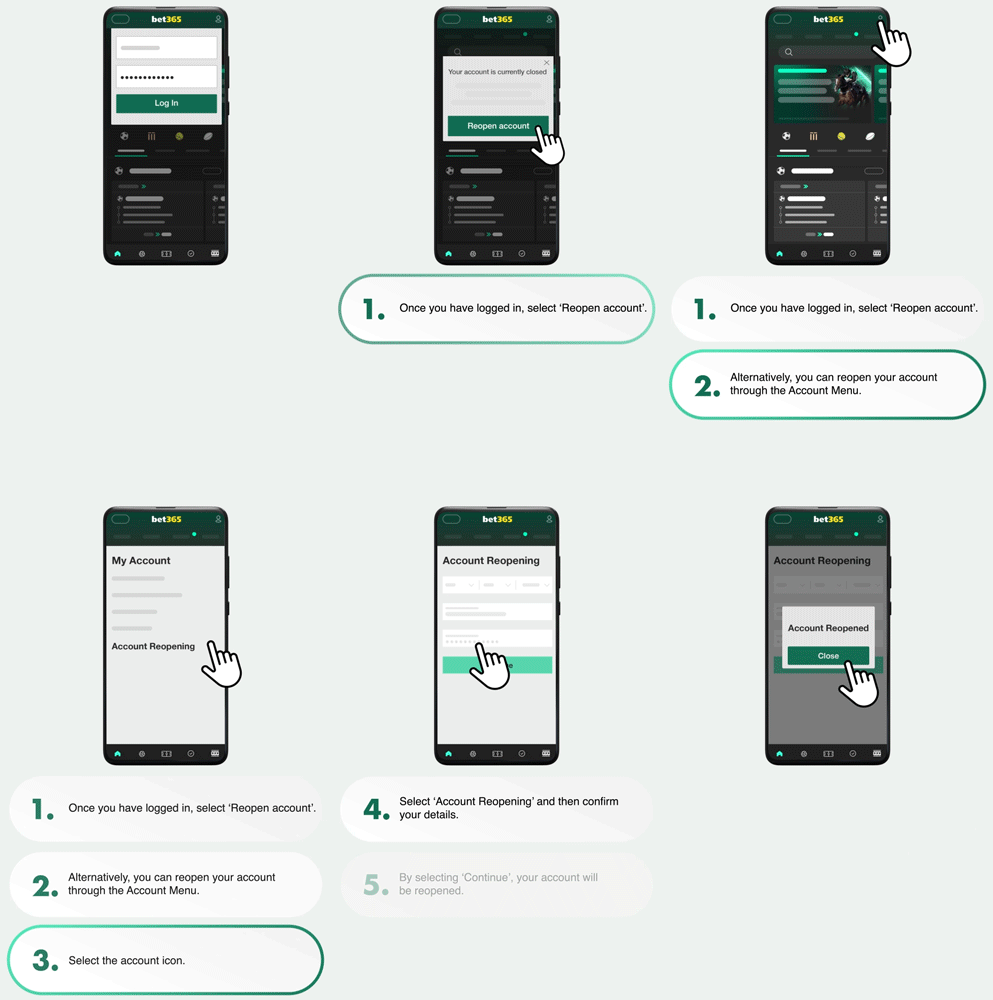
GIF showing how to reopen a closed account
  1. Once you have logged in, select Reopen Account and follow the on-screen instructions.

    Alternatively:

  1. Select the Account Menu My account Icon from the top-right of your screen.

  2. Go to My Account.

  3. Choose Account Reopening and fill in any additional security that is required.

  4. Press Continue and your account is reopened.

Should you experience any issues when attempting to reopen your account online, Contact Us for further assistance.

Account Balance

You can still log in and withdraw any remaining balance you may have, after an online account closure.

Was this article helpful?

Thumbs up logo to symbolise positive
Thumbs down logo to symbolise negative rating

We're glad you found this article helpful!

We're sorry this article wasn't helpful. You might find the information you need in these related articles:

We're sorry this article wasn't helpful. If you have any questions please Contact Us.


Related Articles

Can't find an answer?

Contact Us

bet365 uses cookies

We use cookies to deliver a better and more personalised service. For more information, see our Cookies Policy.

Manage Cookies
Essential Only
Accept All Cookies
Manage Cookies
Strictly Necessary

Cookies required to use the website and features you have requested. They provide content, products and services that you have requested from us. These cookies are essential for the operation of our website. More Details.

Performance

Cookies used to collect information on your website usage. These cookies are used to provide aggregated statistics on visits to our websites.We use these statistics for internal purposes to help us test and improve the performance of our websites and to provide you with a better user experience. Without these cookies, our ability to provide a smoother user experience across your devices may be degraded. More Details

Third Party Marketing/Targeting

Cookies used to deliver adverts relevant to you based on your interests.This can include limiting the number of times you see an advert as well as helping us to measure the effectiveness of any adverts that you see. Without these cookies, you will still see adverts but these will not be adjusted to your interests.This can include limiting the number of times you see an advert as well as helping us to measure the effectiveness of any adverts that you see. Without these cookies, you will still see adverts but these will not be adjusted to your interests. More Details.

Accept All
Confirm My Choices
Allow Necessary Cookies Only
Live Chat
Are you sure you want to end chat?
Live Chat